 MASSIV
The Best Wear OS Workout App for Lifting in 2026
For Wear OS lifting, check whether the watch can record weight and reps, show the next target, and keep logged sets through a dropped phone connection. Massiv starts the workout on an Android phone, then lets you log sets on the watch. The session is stored on the watch until the phone reconnects; watch set logging is free.
A store listing cannot show how an app behaves between sets or after a connection drop. The checks below let you compare those behaviors yourself.
What makes a Wear OS app good for lifting
Ignore the feature-list checkboxes. These are the things you actually use between sets:
- Logging sets from the watch — mark a set done, adjust reps and weight, move to the next set, without touching the phone. Not a "start workout" button that hands everything back to the phone.
- A rest timer with a haptic buzz — the single most valuable thing a watch does for lifting. A tap on the wrist when rest is up beats staring at a phone counting down.
- Rotary input — the Galaxy Watch bezel or a rotating crown is far faster than tapping small +/− targets with chalky hands.
- Today's prescribed set on the wrist — the target weight and reps, not an empty field you have to remember how to fill.
- Tiles and a complication — one swipe or one tap from the watch face into the session, instead of digging through the app launcher mid-workout.
- Graceful behavior when Bluetooth drops. Check what happens to a set logged while disconnected.
The Wear OS problem nobody puts on the feature list
Many Wear OS strength apps pair with a phone. Your phone may be in a locker, in a bag across the room, or just far enough away that Bluetooth disconnects between sets. The useful question is what the watch does with a set logged while the phone is out of range.
A reliable app should accept the set and show it on the phone after reconnection. Test this with a short session before relying on any app for a full workout.
Be precise about “standalone”: some watches can keep logging during a disconnection, while others can start and store an entire workout without a phone. Massiv supports the first case; you need an Android phone to start and store the workout.
What to skip
- Automatic rep counting from wrist motion. It demos well and works inconsistently across lifts. Logging a set manually with the bezel takes two seconds and is always right.
- Heart rate as the headline feature. Fine to record, but HR isn't very actionable during heavy resistance work — it's not a reason to pick an app.
- A watch app that's only a timer. If it can't show your plan or log a set, it's a stopwatch with a logo.
How to choose one
Two tests, both take five minutes:
The workflow test. Once the session is running, log a full set with weight and reps and start the rest timer — without touching the phone. If any step between sets sends you back to the phone, it isn't really a wrist app.
The connection test. Start a workout on the phone and wait until the session appears on the watch. Then move the phone out of Bluetooth range, log two sets on the watch, and reconnect. Both sets should appear on the phone. This checks what happens to real logged work during a connection drop.
How Massiv handles this
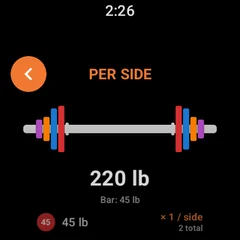
Massiv's Wear OS app is native Kotlin and Jetpack Compose with its own on-watch database. After starting the session on Android, you can see the prescribed weight and reps, check previous-session values, log a set, and run a rest timer with haptics. The watch plate calculator uses the plates you own and is part of Pro; set logging and the rest timer are free.
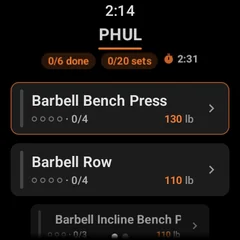
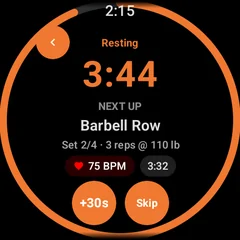
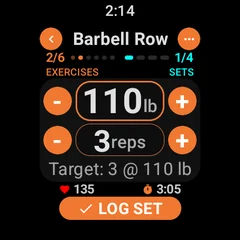
The connection problem is handled at the protocol level rather than hoped away. Every action you take on the watch is written to an on-watch queue before it is sent, tagged with its own ID. The phone acknowledges each one individually, and only an acknowledgement clears it from the queue — so a set logged with the phone out of range stays on the watch until it is confirmed, then flushes automatically on reconnect. When the phone sends back its version of the session, any actions still waiting in the queue are re-applied on top of it. A stale snapshot cannot erase a set you logged offline.
The rest timer syncs as an end timestamp instead of a countdown, so each device works out the remaining time itself. It survives the app being killed, it doesn't drift, and it doesn't need a constant stream of updates to stay accurate.
Massiv runs your program's progression, so the watch shows the right target — not a blank field. Free on Wear OS and Android, no account required.
Download Massiv →What Massiv does not do
Two limits worth stating plainly, because you'd find them yourself in the first week:
- It isn't standalone. The phone owns the workout and the data; the watch is a full-featured client with an offline buffer, not an independent app. You can train through a dropped connection without losing anything, but you can't leave the phone at home.
- There's no Garmin app. Wear OS and Apple Watch only.
A few actions in the watch's ••• menu — the wrist plate calculator, changing a set's type, adding or deleting sets, and swapping an exercise — are part of Pro. Running your program, logging every set, the rest timer, the phone's plate calculator, and watch logging itself are free.
The short version
The best Wear OS workout app for lifting is the one that lets your phone stay in your bag and still has every set when you get it out. Everything else on the feature list is easier to build than that, which is why everyone advertises the rest of it. Massiv was built around the hard part: a native watch app, an offline queue that survives a dropped connection, and a program that tells you the right weight for the next set instead of handing you an empty field.
Run the airplane-mode test on Massiv yourself. Free on Wear OS and Android, unlimited logging, no account required.
Download Massiv →