 MASSIV
FitNotes Alternative: Keeping the Simplicity, Adding a Program

FitNotes is free, ad-free, account-free and Android-only — and people usually look for an alternative for one of two reasons: they switched to an iPhone, or they want a program rather than a notebook. Massiv keeps what FitNotes users value (no ads, no account, your log on your device) and adds 17 built-in programs that run their own progression. It reads FitNotes CSV exports and works on both platforms.
FitNotes has a reputation it earned honestly. It's free, it has never shown an ad, it doesn't want an account, and it opens instantly and gets out of the way. People who use it tend to really use it — for years. So if you're looking for a FitNotes alternative, you're almost certainly not looking for "more app." You're looking for one specific thing FitNotes doesn't do, without giving up everything it does.
Why people look for one
- You switched to an iPhone. This is the big one. FitNotes is Android-only, and there's no official iOS version — so a phone upgrade ends a five-year training log.
- You want a program, not a notebook. FitNotes records what you did beautifully. It doesn't tell you what to do next, so the progression lives in your head or a spreadsheet.
- You want it on your wrist. No watch app means the phone comes out between every set.
- You want your history somewhere safe. Local-only data is a feature right up until you lose the phone.
Worth saying clearly: none of those are bugs. FitNotes is deliberately a log, and it is a very good one — it just stops where your programming starts. Every reason above is a reason it can't follow you, not a reason it was built badly.
What not to give up
Most "upgrades" from FitNotes are a downgrade in the things FitNotes users actually care about. Before switching, check that the alternative still gives you:
- No ads. Not "fewer ads," not "ad-free on the paid tier."
- No mandatory account. You should be able to open the app and log a set without handing over an email address.
- Your data on your device, exportable, in a format you can read — not locked in someone's cloud.
- Speed. If logging a set takes more than a couple of taps, you'll quietly stop doing it.
Your options
Hevy and Strong are the popular cross-platform loggers, both cloud-account-based with paid tiers. Jefit has the biggest exercise library but shows ads on its free tier. Boostcamp is worth a look if free programs are the whole reason you're moving. And Massiv, which was built with the same local-first assumptions FitNotes users already expect.
FitNotes remembers what you did. Massiv decides what comes next — and still asks for no account, shows no ads, and keeps your log on your phone.
Get Massiv free →Don't lose your FitNotes history
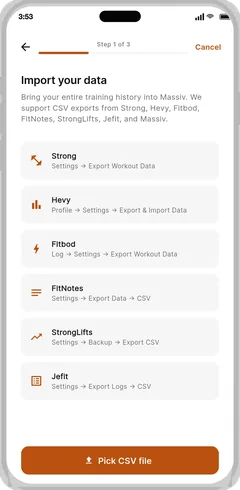
FitNotes exports a CSV of your log, and that file is the whole migration. Export it before you uninstall anything — if you're switching phones, export it before you hand the old one in, because the app's data lives on the device.
Two details that matter when you import it somewhere else: FitNotes writes dates in a short 6/5/2022 style, and depending on how you exported, the weight column may carry no unit at all. A file like that is genuinely ambiguous — nothing in it distinguishes 100 kg from 100 lb — so an importer should ask you which it is rather than guess and silently double your bench.
How Massiv handles this for you
Massiv keeps the parts you'd miss. Your log is local-first and lives on your phone, there's no account to create, and there are no ads on any tier. You can export a full backup whenever you want and re-import it later.
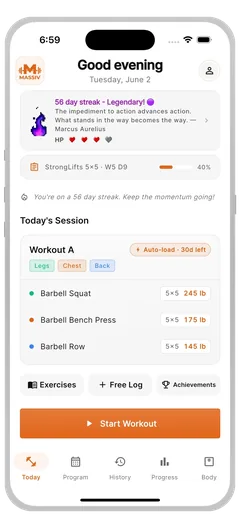
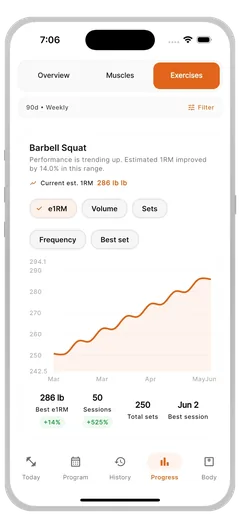
What it adds is the part you were keeping in your head: 17 built-in programs that run their own progression, all free — StrongLifts 5×5, GZCLP, 5/3/1-style waves, PPL, Texas Method and more. The app carries your previous numbers forward, tells you the target for the next set, and rounds it to the plates and dumbbells you actually own instead of prescribing a weight you can't load.
It runs on iPhone and Android, so a phone switch doesn't end your log, and watch logging is free on both Apple Watch and Wear OS. The importer reads FitNotes CSV exports and asks about units when the file doesn't specify them, so your PRs and starting weights land correctly rather than approximately.
Keep the no-ads, no-account habit — add the program. Free on iPhone and Android, and your FitNotes CSV comes straight across.
Download Massiv →FitNotes earned its reputation by refusing to get in your way, and that's exactly the standard a replacement has to meet. Massiv meets it — no ads, no account, your log on your device — and then does the part FitNotes never tried to: it runs the program, carries your numbers forward, and works on iPhone as well as Android so the next phone doesn't end your history. The switch costs you one CSV file and nothing else you value.